Page 1 of 1
How do I install imagick php extension in MAMP?
Posted: Sat Sep 06, 2025 1:36 pm
by rakader
Hi everybody,
I'm using MAMP 7.2 with PHP8.3.14 for testing purposes on a Mac with Sequioa 15.6.1. WordPress 6.2.2 tells me that iMagick extension from php is missing and reported this as an error. I tried to install it with homebrew, but there was no effect. On Youtube I find nothing about this problem.
Can anybody help?
Thanks in advance
Ralph
Re: How do I install imagick php extension in MAMP?
Posted: Sun Sep 07, 2025 3:18 pm
by WrongSizeGlass
Hey Ralph,
My only experience with MAMP is MAMP Pro, so if anything I say is off it's probably because of the differences between Free and Pro. If so, I apologize.
I'm not sure about the 7.x Free version user interface, but in 6.x Pro enabling imagack is done via the PHP section.
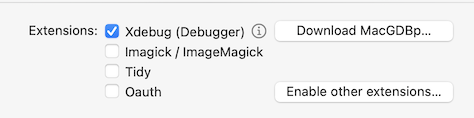
- Mamp Ui Php Imagick (22.38 KiB) Viewed 53019 times
First, make sure that the imagick.so file is in your MAMP/PHP version's extensions directory. Note that I don't have 8.3.14 on my system so I don't know the date in the "no-debug-non-zts" directory name mentioned below.
- Applications/MAMP/bin/php/php8.3.14/lib/php/extensions/no-debug-non-zts-YYYYMMDD/imagick.so
If there is no UI option for imagick in the Free version you can enable it manually in the php.ini file. Note that the best way to edit the actual php.ini file used by MAMP is to edit it via MAMP since MAMP saves a copy in '/Library/Application Support/appsolute' (at least on Pro)
- File>Open Template>PHP>8.3.14
- In the file, search for "MAMP_Imagick_MAMPextension=imagick.so"
- Remove the "MAMP_Imagick_MAMP"
If you don't see "MAMP_Imagick_MAMPextension=imagick.so", just paste "extension=imagick.so" in the php.ini file where you see other "extension=" statements.
I hope this helps (or at least points you in the right direction).
WSG